
New: Design a Whole Coloring Book in the Free Coloring Book Studio
Pick a cover, mix coloring pages with mazes, word searches and draw-your-own pages, then print the result as a folded booklet. Free, in your browser, nothing uploaded.
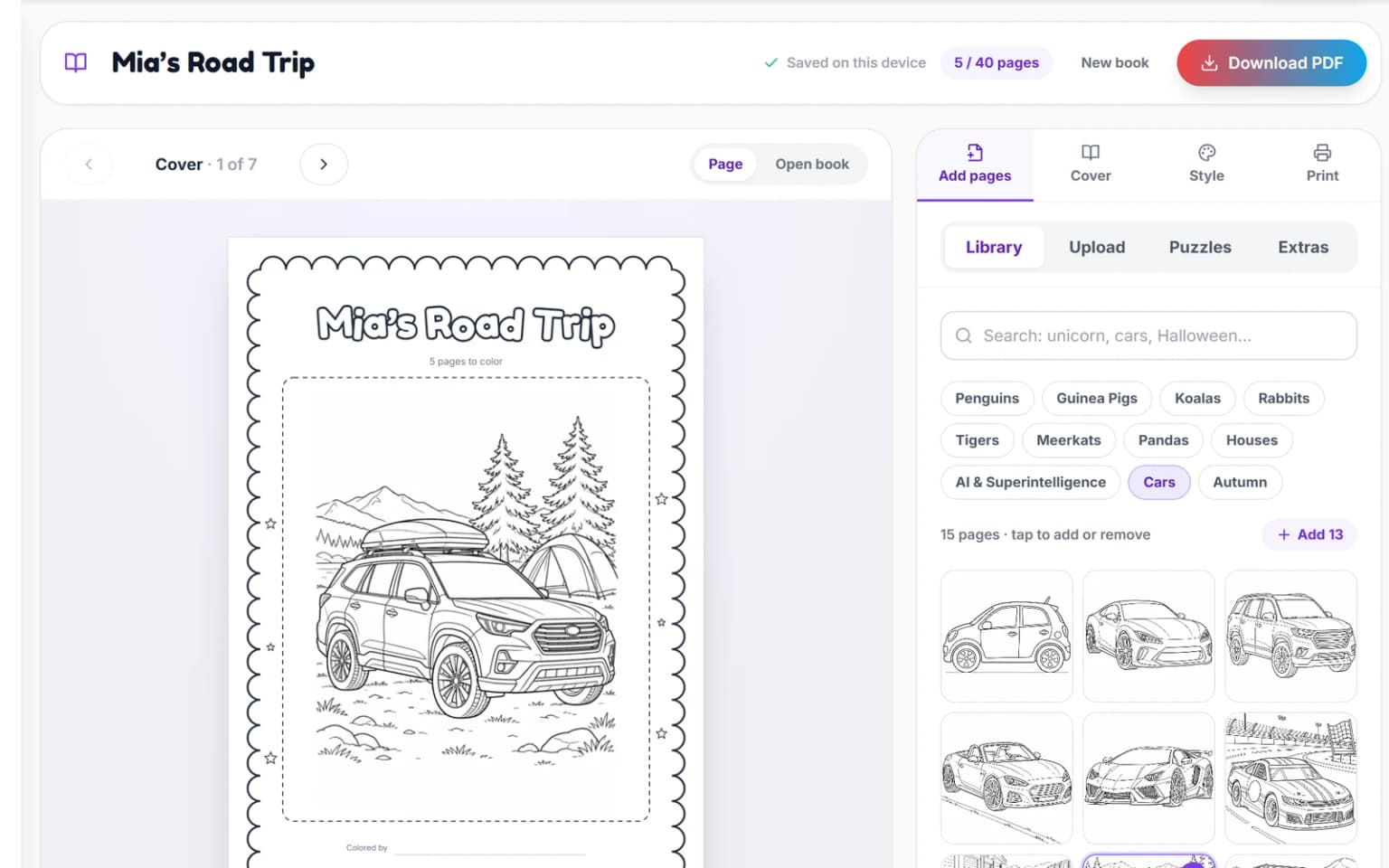
A stack of printed pages is nice. A book with a cover, your child’s name inside and a maze halfway through feels like a present. The new Coloring Book Studio is for making that kind of book. You design it page by page in your browser and download one PDF that prints as single sheets or as a folded, stapled booklet. It is free, and you do not need an account.
Studio or quick maker?
The original coloring book maker is still here and still the fastest way to turn a handful of pictures into a PDF: add images, pick a page size, download. Use the studio when the book itself matters. It adds cover designs, frames and captions, puzzles with an answer section, a “this book belongs to” page and the page order for booklet printing.
Four ways to fill the pages
A book can hold up to 40 content pages, plus the cover, special pages and answers. Mix them in any order and drag pages around until the sequence feels right.
- Library: search our free printable coloring pages and add them with a click. The new animal, car and house pages are in there too.
- Upload: add your own pictures, such as a page made with the photo to coloring page tool. For a phone photo of a child’s drawing, select the page and turn on Clean up to whiten the paper and darken the lines.
- Puzzles: generate a maze in four sizes from ages 4+ to a proper challenge, a mandala in three detail levels, or a word search from your own list or a ready theme such as Animals, Ocean or Space.
- Draw-your-own pages: an empty frame with a prompt like “Draw your pet”, “Draw your dream house” or “Design your own monster”, or a prompt you write yourself.
A cover worth coloring
Choose between four cover designs: Classic, Playful, Storybook and Bold. Type a title, subtitle and author. The cover uses the first picture in the book unless you pick another one or choose none. By default the title prints in hollow outline letters with black ink, so the cover is one more thing to color. Switch off outline letters, or pick violet, rose, sky, emerald or amber, if you are printing in color.
Under Extras you can add a “This book belongs to” page with a name or a blank line, a “Well done!” certificate for the end, and an answer section for the mazes and word searches. Titles and names can use accents, other alphabets and emoji. Pages are drawn by your browser, so what you see in the preview is what prints.
Frames, captions and page numbers
Pick a frame for the pages: line, rounded, double, dashed, cloud or none. Add a caption to any page, and choose page numbers as 7, Page 7 or a number in a circle. Pictures either fit inside the frame without cropping or fill it, trimming the edges. Rotate a single page if it needs it.
Printing a folded booklet
Under Print, choose A4 or US Letter, the orientation and margins, then pick a layout. Single pages prints one page per sheet and is the easiest. Folded booklet puts two pages side by side on each sheet in the order a stapled book needs, and adds blank pages so the total comes out in multiples of four, as a folded book needs.
- Choose Folded booklet and select Download PDF.
- Print double-sided with “flip on short edge”, at 100% or actual size.
- Keep the sheets in the order they come out of the printer.
- Fold the stack in half and staple along the fold, or sew it with a few stitches of thread.
If you print single pages and plan to use markers, turn on blank backs. Every picture gets an empty reverse side, so ink that bleeds through does not spoil the next page. Our guide to printing coloring pages at home covers paper weight and printer settings.
An example: a road-trip book
Here is one plan for a car journey. When the PDF is ready, the studio tells you how many sheets to print.
- A Playful cover titled “Mia’s Road Trip”, with the SUV camping trip as cover art.
- A “This book belongs to” page.
- Five library pages: the SUV camping trip, a rally car, a seaside house, a panda cub and a penguin on a snow slide.
- A small maze, a word search with the places you will pass, and a medium mandala.
- Two draw-your-own pages: “Draw where we are sleeping tonight” and “Draw the best thing you saw today”.
- Answers at the back, and a “Well done!” certificate to finish.
Your book stays on your device
The studio saves as you go, pictures included, in your browser’s own storage. Close the tab and your book is still there the next time you open the studio on the same device and browser. Nothing is uploaded, so it will not follow you to another device, and a private window forgets it when closed.
Pictures you drew or photographed are yours to use however you like. Pages from our free library are for personal, non-commercial use, so please do not sell books that contain them. Ready to start? Open the Coloring Book Studio and add your first page.